Membership Packages
Get your business in front of visitors planning a Barbados trip,
and the people who live here all year.

Claimed

FREE / year

Take control of the listing we already built for you.

  • Your business details, address, phone, and opening hours
  • Your listing on the map
  • Edit it yourself, any time
  • 1 category

Your website, email, and social links stay hidden until you upgrade.

Option 1: Verified

$500 / year

Everything shows, and you can see who is looking.

  • Your website, email and social links on display
  • Description up to 650 words
  • Signature photo, three-photo cover and 6 gallery images
  • Analytics dashboard
  • Google Reviews, ratings and the verified badge
  • 2 categories

Option 2: Featured

$1,200 / year

Your photo on 6 guide pages, and a post every month.

  • Everything in Verified, plus
  • 6 Photo Ad Spots on related guide pages
  • 12 social media posts a year
  • 12 gallery images
  • Description up to 850 words
  • 1 embedded video
  • 2 categories

Option 4: Premier

$3,600 / year

Three posts a month, on 18 pages.

  • Everything in Promoted, plus
  • 18 Photo Ad Spots and 36 social media posts a year
  • 36 gallery images
  • 2 newsletter features and 2 featured events
  • Description up to 1,550 words
  • 3 embedded videos
  • 4 categories

Option 5: Partner

$4,800 / year

First call on the pages that fit your business best.

  • Everything in Premier, plus
  • 24 Photo Ad Spots, with priority on the most relevant pages
  • 48 social media posts a year, four a month
  • 48 gallery images and unlimited description
  • 3 newsletter features and 3 featured events
  • 4 embedded videos
  • 5 categories
Questions?
Guidelines & Tips
Image Clarity

Logo images should be no smaller than 160 x 160 px for the best clarity, and the subject matter should be as centered as possible to avoid being cut off at the edges.

Image Size Limits

Images can have a maximum file size of 350 KB. Should you need to compress your images, no problem! Here’s a free tool with super simple instructions.

  1. Open Squish
  2. Upload an image(s)
  3. Download your optimized image(s)
Guidelines & Tips
Image Clarity

Headshot (Listing Preview) images should be no smaller than 800 x 900 px and Headshot (Listing Page) images should be no smaller than 160 x 160 px, with the subject matter centered as possible to avoid being cut off at the edges.

Image Size Limits

Images can have a maximum file size of 350 KB. Should you need to compress your images, no problem! Here’s a free tool with super simple instructions.

  1. Open Squish.
  2. Upload an image.
  3. Download your optimized image.
Google Reviews
Display your reviews with these simple steps.
  1. From your EmbedSocial dashboard, click the ‘+’ icon next to the ‘Sources’ menu item.
  2. Choose ‘Google.’
  3. Click ‘Connect Google Account.’
  4. Authenticate with Google using the credentials tied to the account where your Google Reviews are coming from.
  5. After authentication is successful, click ‘Create Widget.’
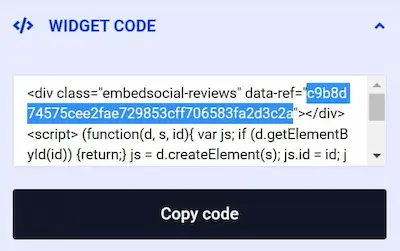
  6. Copy the unique identifier from the Widget Code, as shown in the image below, highlighted in blue.
  7. Edit your Listing and paste the code into the ‘Google Reviews’ field.
  8. Save changes.
Guidelines & Tips
Image Clarity

Gallery images should be no smaller than 1920 x 1080 px for the best clarity, and the subject matter should be as centered as possible to avoid being cut off at the edges.

Image Size Limits

Images can have a maximum file size of 350 KB. Should you need to compress your images, no problem! Here’s a free tool with super simple instructions.

  1. Open Squish
  2. Upload your image(s)
  3. Download your optimized image(s)
Find your business

We may have already built your listing. Search for your business. Claim it if it is there, add it if it is not. Both are free.