
Membership Packages
Get your business in front of visitors actively planning their Barbados trip. Every listing ranks on Google from day one.

Option 1: Verified Listing

$500 / year

Your business verified, controlled, and ranking on Google. Pure presence with no promotional engine.

1 Premium Profile Page (PPP)
Business details, map and directions
Contact, booking URLs, social links
Analytics Dashboard
Google Reviews display
Ratings and Reviews
3,000 characters (~425 words) description
3 Gallery Images
Photo Ad Spots
Social Media Posts
Newsletter Features
Featured Events
Embed Videos

  Package Features

Option 2: The Good Package

$2,400 / year

Your photo on 12 relevant pages. One social post every month.

1 Premium Profile Page (PPP)
Business details, map and directions
Contact, booking URLs, social links
Analytics Dashboard
Google Reviews display
Ratings and Reviews
6,000 characters (~850 words) description
3 Gallery + 9 Bonus Images (12 Total)
12 Photo Ad Spots on relevant pages
12 Social Media Posts per year
1 Newsletter Feature per year
1 Featured Event per year
1 Embed Video

  Package Features

Option 4: The Best Package

$4,800 / year

36 targeted placements. Three posts per month. Built for serious operators.

1 Premium Profile Page (PPP)
Business details, map and directions
Contact, booking URLs, social links
Analytics Dashboard
Google Reviews display
Ratings and Reviews
11,000 characters (~1,550 words) description
3 Gallery + 33 Bonus Images (36 Total)
36 Photo Ad Spots on relevant pages
36 Social Media Posts per year
3 Newsletter Feature per year
3 Featured Event per year
3 Embed Video

  Package Features

Option 5: The Elite Package

$6,000 / year

Maximum exposure. Weekly posts. For hotels and major operators.

1 Premium Profile Page (PPP)
Business details, map and directions
Contact, booking URLs, social links
Analytics Dashboard
Google Reviews display
Ratings and Reviews
Unlimited description
3 Gallery + 49 Bonus Images (52 Total)
52 Photo Ad Spots on relevant pages
52 Social Media Posts per year
4 Newsletter Feature per year
4 Featured Event per year
4 Embed Video

  Package Features
Questions?
Guidelines & Tips
Image Clarity

Logos should be no smaller than 160 x 160 px, with the subject matter centered as possible to avoid being cut off at the edges.

Image Size Limits

Images can have a maximum file size of 1 MB. Should you need to compress your images, no problem! Here’s a free tool with super simple instructions.
  1. Open Squoosh.
  2. Upload an image.
  3. Choose WebP from the dropdown.
  4. Download your optimized image.
Guidelines & Tips
Image Clarity

Headshot (Listing Preview) images should be no smaller than 800 x 900 px and Headshot (Listing Page) images should be no smaller than 160 x 160 px, with the subject matter centered as possible to avoid being cut off at the edges.

Image Size Limits

Images can have a maximum file size of 1 MB. Should you need to compress your images, no problem! Here’s a free tool with super simple instructions.

  1. Open Squoosh.
  2. Upload an image.
  3. Choose WebP from the dropdown.
  4. Download your optimized image.
Google Reviews
Display your reviews with these simple steps.
  1. From your EmbedSocial dashboard, click the ‘+’ icon next to the ‘Sources’ menu item.
  2. Choose ‘Google.’
  3. Click ‘Connect Google Account.’
  4. Authenticate with Google using the credentials tied to the account where your Google Reviews are coming from.
  5. After authentication is successful, click ‘Create Widget.’
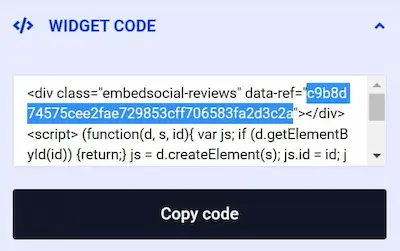
  6. Copy the unique identifier from the Widget Code, as shown in the image below, highlighted in blue.
  7. Edit your Listing and paste the code into the ‘Google Reviews’ field.
  8. Save changes.
Guidelines & Tips
Image Clarity

Cover and Gallery images should be no smaller than 1920 x 1080 px for the best clarity, and the subject matter should be as centered as possible to avoid being cut off at the edges.

Image Size Limits

Images can have a maximum file size of 1 MB. Should you need to compress your images, no problem! Here’s a free tool with super simple instructions.

  1. Open Squoosh.
  2. Upload an image.
  3. Choose WebP from the dropdown.
  4. Download your optimized image.
Add Listing

Wondering if you already have a Listing on our platform? Click here to find out.

Claim Listing

Find and take control of any Listings you have on our platform. No Listing to Claim? Click here to add one.